Add CCD Filter to Photos Online

Upload your photo and use AI to recreate compact-camera flash, cool colors and digital texture. Choose a look, adjust the effect and keep the moment yours.

Upload your photo

JPG, PNG or WebP. Drop your photo here or use the + button.

Choose a starting instruction

Bright direct flash with darker room shadows.

A CCD photo filter for three different kinds of memories

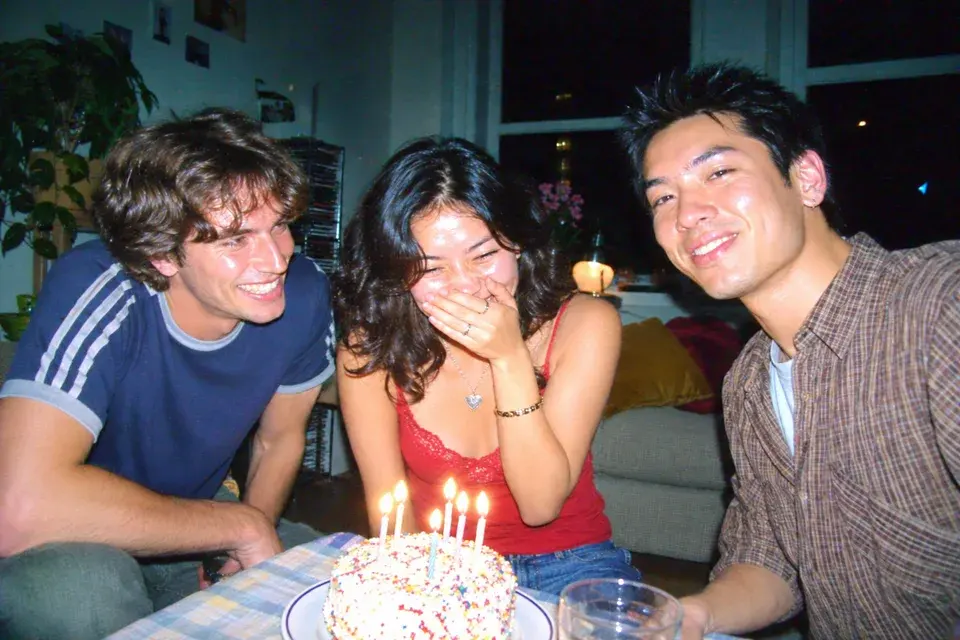
Birthday scene with direct flash, deeper room shadows and visible digital texture.

Bring the party flash back

Use the CCD photo filter for birthday tables, house parties and after-dinner group pictures. The flash preset brightens the people closest to the camera and lets the room fall into deeper shadow, creating that familiar small-camera separation. Candle flames, jewelry and shiny fabric can catch small bright highlights while the faces stay readable.

Choose a picture with clear expressions and enough surrounding room to show the lighting change. If your original already has strong flash, request a moderate treatment and let the color and texture do more of the work. For a bolder party look, increase the intensity, then check skin highlights, the cake and each person's eyes before saving.
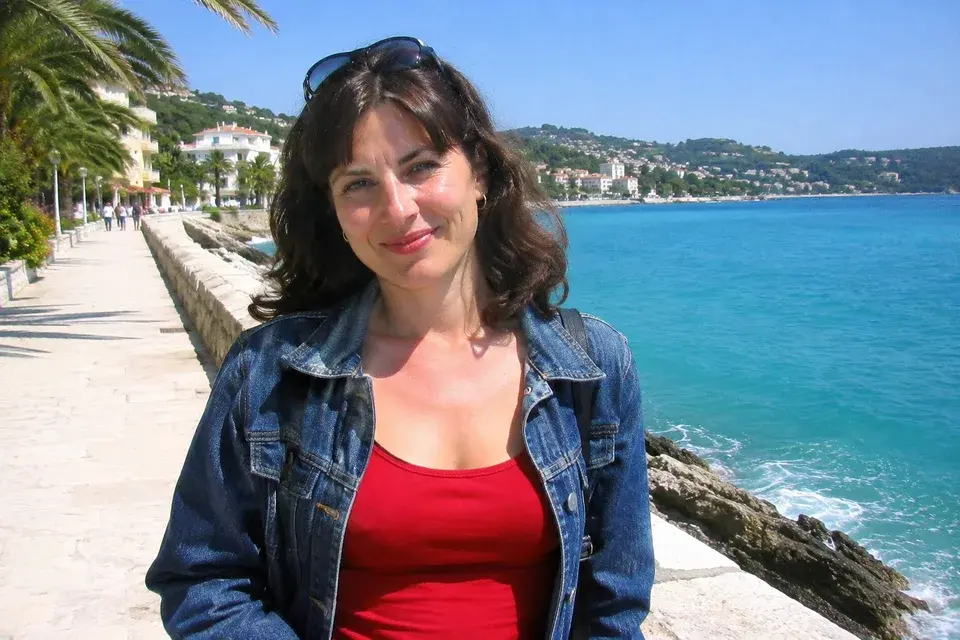
Daylight seaside portrait with punchy blues, warm skin and cooler shadows.

Give daylight travel photos a compact-camera palette

A CCD photo filter can give a sunny travel picture rich blue water, lively clothing colors and slightly cooler shaded areas without making it look like nighttime. The daylight preset keeps the direction of the sun and the original location. Its character comes from simpler contrast, bright highlights and modest digital texture rather than a new flash source.

This direction suits beach promenades, markets, parks and informal sightseeing portraits. Keep the horizon and landmarks in your frame so the image still carries the memory of the trip. Use the prompt box to protect a red jacket, a shop sign or the color of the sea. Start with natural intensity when the source already has strong sunlight.

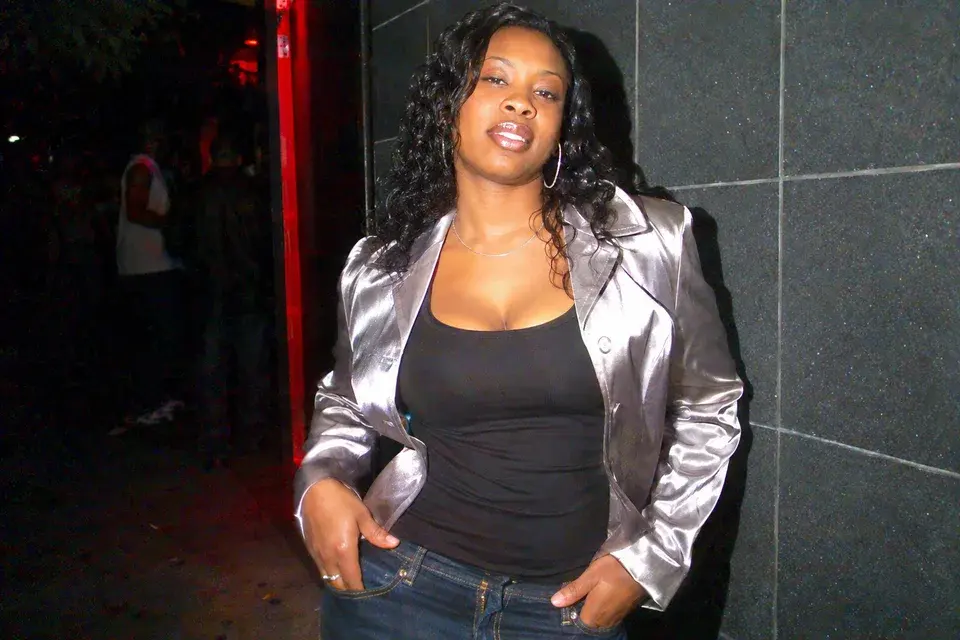
Silver outfit under compact-camera flash with a dark nighttime setting.

Make a Y2K outfit stand out at night

Night-out photographs are a good match for the CCD photo filter because metallic accessories, satin and denim respond differently to a close flash. The night-out preset asks for a bright subject, sharp reflective accents and a darker setting. Fine noise adds the feel of an older digital file while keeping the clothing design recognizable.

Use an outfit photograph where the face, garment edges and accessories are visible. Mention any embroidery, jewelry or distinctive seams that should remain. A medium crop often shows the texture better than a distant full-body picture. Keep the background simple enough that the flash falloff reads clearly, and reduce the treatment if the shiny fabric becomes a solid white patch.

What the CCD photo filter changes

A convincing digicam look starts with the occasion. A birthday snapshot needs different lighting from a sunny holiday photograph, even when both share punchy colors and small-camera texture. These style previews show three directions you can request from your own picture. Start with the closest scene, then choose how strongly the treatment should appear. The editor uses your uploaded photograph as the reference and includes instructions to retain faces, clothing, composition and recognizable surroundings.

Shape the compact-camera look

Control the CCD photo filter without writing a technical recipe

Choose Party flash, Daylight or Night out from the preset instructions. Subtle flash and Bold flash provide lighter and stronger party treatments. Each preset fills the prompt box with a complete editing brief. You can edit that text to ask for cooler shadows, less noise or a darker background before generating your picture.

A useful request names one visible adjustment. Try ‘keep the flash bright but reduce the colored noise’ or ‘make the background darker while retaining the birthday decorations.’ For an already noisy source, choose subtle texture. For a very polished modern portrait, a stronger flash treatment can make the change easier to see without replacing the setting.

Keep faces, clothing and the moment recognizable

The CCD photo filter begins with your actual picture and asks the model to preserve the people, facial features, expressions, clothes and camera angle. That makes it useful for memory posts where the image should still feel like the same evening. Add a short note for important details such as glasses, a patterned shirt or a friend's position at the table.

Open the completed result at full size and compare it with your original photograph. Look at eyes, smiles, hairlines and printed clothing as well as the overall color. If something changes more than you wanted, return to your original photo and narrow the request. Keep the creative instructions focused on capture style rather than new poses or people.

Choose the right starting photo for a CCD photo filter

A sharp, ordinary snapshot gives this tool useful material: clear faces, visible clothes and lighting that fits the chosen scene. Phone photos work well as references, including casual pictures with an imperfect background. Upload the original file when possible; a heavily compressed screenshot can hide the details you want to preserve.

For a party, choose a frame taken near the people rather than a wide view of the entire room. For daylight, keep an obvious source of sun or shade. For an outfit, include the fabric and accessories that define the look. These choices give the requested color, flash and texture a concrete photographic setting instead of relying on a generic vintage effect.

How to use the CCD photo filter

  1. Upload your snapshot

    Choose one JPG, PNG or WebP file. A clear birthday, holiday or outfit photo is a useful starting point. You can choose the image before signing in; generation requires an account. The source preview lets you confirm that you selected the right picture.

  2. Pick the scene and intensity

    Choose the preset that matches your lighting, then adjust its prompt to describe the strength and details you want. The CCD photo filter prepares the style instructions for you. Choose a model and image size, review the credit cost when signed in, then press Generate. You can keep the preset text as supplied.

  3. Compare and download

    When the image is ready, open it at full size and compare it with your original photograph. Check faces and bright areas at a useful size. Download uses the site's existing purchase access. If you want another version, adjust one instruction and generate again from your source photograph.

CCD photo filter, old phone look or film styling?

ChooseUse it for
CCD digicamDirect flash, cool shadows, punchy color and small-sensor texture for parties and Y2K snapshots.
Old iPhone cameraA gentler everyday camera-roll treatment with simple exposure and restrained detail; useful for cafe and travel photos.
Film-inspired stylingA different creative direction built around film color and grain. Request it in the general editor when that is the look you want.

CCD photo filter questions

Can I use the CCD photo filter on a modern phone photo?

Yes. Upload the phone photograph and choose the scene that matches its light. You do not need a compact camera or a particular phone. Keep the face and important objects visible, and use the original file rather than a screenshot when available.

Should daylight pictures have the same flash effect as party photos?

Usually, keep the original sunlight and use the Daylight option. It emphasizes color and digital texture without asking for a dark room. If the photo was actually taken with fill flash, mention that in your prompt so the effect follows the source.

How do I avoid making skin too grainy or washed out?

Choose Subtle flash and ask for less noise on the face with visible eye and skin detail. On a strongly flashed photo, reduce added flash brightness first. It is often enough to keep the background contrast and cool shadow color while making the skin treatment lighter.

Does this recreate one exact camera model?

The tool recreates a visual style through AI editing. You can describe a compact-camera mood, but it is not a calibrated simulation of a specific sensor or lens. Name the qualities you want to see, such as direct flash and cool shadows, for a more useful creative brief.

Can I use it for a whole group?

Yes, upload one group photograph and ask to preserve every person and their position. Choose a source where each face is reasonably clear. Check all faces in the result, especially people farther from the camera, and keep the requested transformation focused on lighting, color and texture.

View current pricing · Privacy policy

Give your next snapshot the digicam look

Start with your own photo, choose a scene and make the CCD photo filter as subtle or expressive as the memory needs.

Apply the CCD filter