
Instagram multi-pose photos
Make a single outfit collage for a post or personal mood board. Try a white-background pose sheet, then edit the pose list to match your style. Keep heads, hands and shoes inside each panel.
One outfit. More ways to show it.
Turn one photo into a multi-pose fashion lookbook.
Upload an outfit photo, choose a lookbook photo prompt and create a studio grid, streetwear collage or editorial frame. Describe the poses you want and the details you want to keep.
Upload your photo
JPG, PNG or WebP. Drop a photo here or use the + button.
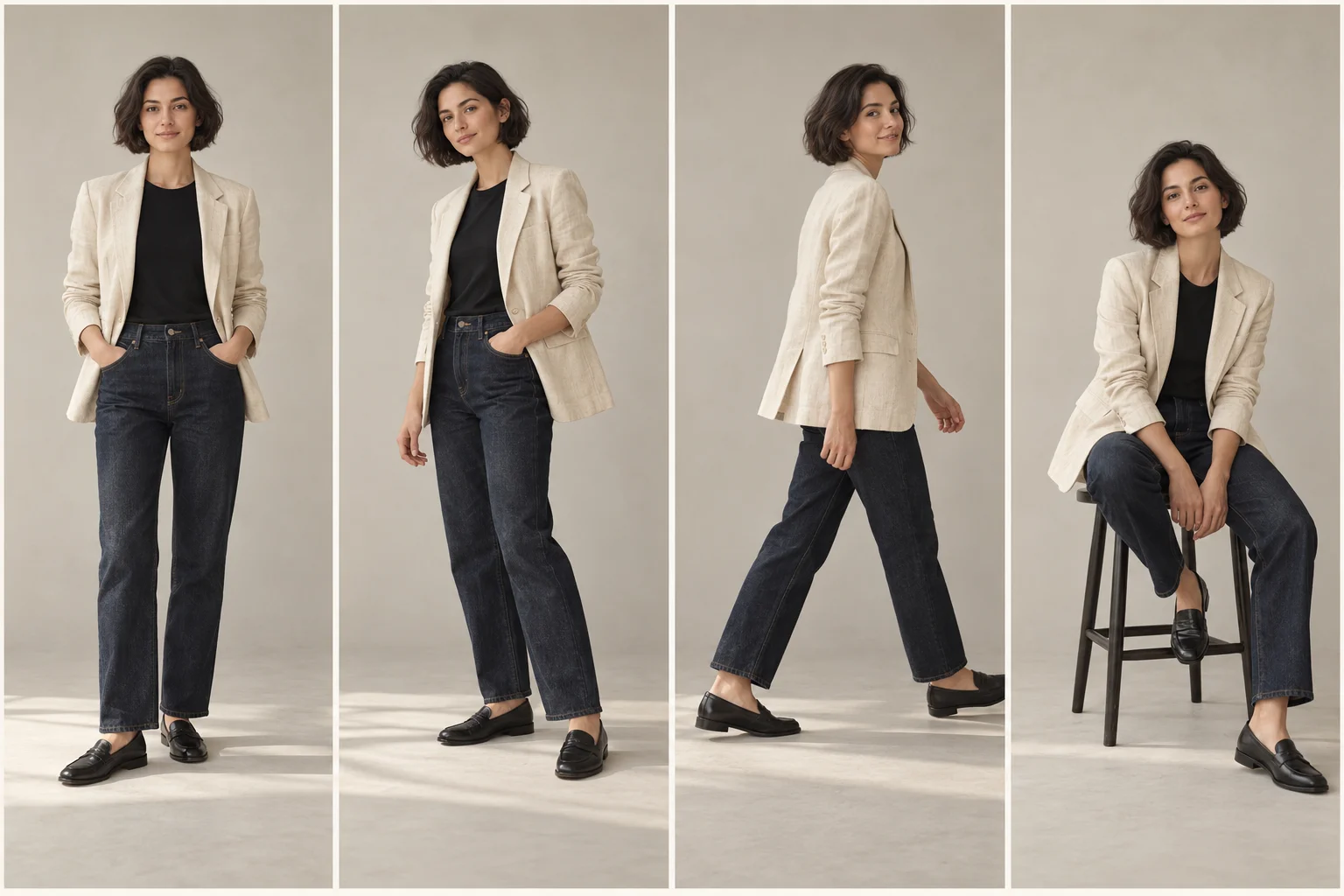
A small fashion story
A front view shows the silhouette. A walking pose adds movement. A seated frame changes the mood. Bring those views together with a shared backdrop and lighting direction, so the outfit feels like part of one shoot.
Start with four poses for a readable sheet. For a closer view of stitching or fabric, create one full-size frame instead of squeezing more panels into the collage.
Find your lookbook promptMake a single outfit collage for a post or personal mood board. Try a white-background pose sheet, then edit the pose list to match your style. Keep heads, hands and shoes inside each panel.
Give a denim, tailoring or everyday outfit photo a shared editorial direction. A simple setting lets silhouette and texture carry the image; you can request an urban wall or a neutral studio without changing the clothes.
Explore how a collection could look across poses and backgrounds. Reuse the same visual brief for each garment, then check the real product against every generated image before using it in a listing or presentation.
Start with a clear brief
Choose “Use this prompt” to fill the editor, keeping your uploaded photo in place. Change the setting or poses to suit your outfit. Choosing a prompt does not start generation or spend credits.
01
A simple starting point: one person, one outfit, four different poses in a 2 × 2 grid.
Use the uploaded photo as the reference for the person and outfit. Create one fashion lookbook image arranged in a clean 2-by-2 grid, with exactly four separate panels: front-facing standing, three-quarter standing with one hand in a pocket, a relaxed walking pose, and seated on a plain stool. Keep the same face, hairstyle, body proportions, clothing colors, garment cut and accessories in every panel. Show the full outfit with space around the head and shoes. Use a warm white studio background, soft daylight and matching shadows across the grid. Keep fabric texture visible. No captions, extra people or overlapping bodies.
02
Request a single collage with two rows of four poses. More panels leave less space for fine detail.
Create one multi-pose lookbook collage from the uploaded outfit photo, arranged in two rows of four equally sized panels. Show the same person in eight distinct poses: standing front view, three-quarter view, side profile, walking, sitting on a stool, looking over one shoulder, hands in pockets, and a relaxed lean. Preserve the reference face, hairstyle, outfit, colors and accessories in every panel. Use a clean white studio, consistent soft lighting, narrow gutters and full-body framing. Keep each person inside their own panel. Do not add text, new garments or extra people. Make the collage one image, not separate files.
03
Turn an everyday outfit shot into a coordinated urban fashion triptych.
Use the uploaded person and outfit to create one streetwear lookbook triptych with three equal vertical panels. Show a relaxed front-facing pose, a natural walking pose and a three-quarter standing pose. Retain the same face, hair, jacket or top, trousers, shoes, garment colors and visible artwork. Use the same simple concrete wall and pavement in each panel, overcast daylight, realistic fabric and restrained editorial color grading. Keep the full outfit in frame and the background quiet. No invented brand lettering, captions or additional people.
04
Give embroidery, borders and draping more room with a two-panel composition.
Create one two-panel fashion lookbook from the uploaded photo of a person wearing a saree or detailed traditional outfit. Use a full-length front view and a gentle three-quarter standing view. Keep the same face, hairstyle, jewelry, garment colors, embroidery, border pattern and drape. Use a neutral studio backdrop and soft even lighting so the textile remains visible. Keep hands relaxed and away from important decorative details. Do not redesign the outfit, add accessories or invent text. Retain natural body proportions and realistic fabric folds.
05
Generate one larger frame when a collection page needs more detail than a collage can hold.
Create a single editorial lookbook photograph using the person and outfit in the uploaded reference. Retain the face, hairstyle, body proportions, garment cut, colors, seams and accessories. Place the person in a relaxed full-length standing pose against a pale warm-gray studio background. Use soft directional window light, gentle floor shadows and natural skin and fabric texture. Leave clean space around the silhouette and keep both shoes visible. Keep the clothing as the focus. No collage, text, decorative graphics or extra people.
06
Start from an on-model garment photo and keep one visual direction across your collection.
Use the uploaded on-model garment photo to create one clean clothing-brand lookbook image. Keep the same model identity and the actual garment's shape, length, color, visible stitching, closures, print placement and fabric texture. Use a relaxed three-quarter standing pose, an ivory seamless studio background, soft frontal daylight and a full-length eye-level composition. Keep the model scale and lighting suitable for repeating across other collection photos. Do not add logos, alter the product design or hide important garment details. Produce a single photograph without text or borders.
STEP 01
Choose a sharp, well-lit photo of one person with their face and clothing visible. A full-length photo gives the editor more information about trousers, shoes and proportions than a close-up selfie. Upload JPG, PNG or WebP.
STEP 02
Start with the four-pose prompt, or pick an eight-pose sheet or single editorial image below. Name the poses, background and details to preserve. Set the output ratio in the editor; a square is a useful starting point for a 2 × 2 grid.
STEP 03
Sign in, check the displayed credit cost and generate one image. Compare the face, hands, outfit and panel count with your request. Simplify the instruction if needed, then download the result you want to keep.
Build the instruction in this order: reference person and outfit → panel layout → poses → background and lighting → details to preserve. Change one part at a time so you can see which instruction improves the image.
Mention the face, hairstyle, outfit cut, colors and accessories. For a detailed garment, name the embroidery or print placement. These instructions guide the model; they do not lock pixels or guarantee the same identity.
Standing, walking and sitting communicate clear changes. Combining complex hand gestures, props and camera angles in every panel makes mistakes harder to isolate. Reduce the pose count if bodies overlap or faces repeat poorly.
Inspect hands, eyes, jewelry, buttons and lettering. A new angle reveals areas the reference never showed, so the model may invent them. For exact garment details, supply a clearer reference or keep the original photograph.
| Format | Use it for | What to expect |
|---|---|---|
| 4-pose grid | A first lookbook or outfit post | One image with four requested panels; more room per pose. |
| 8-pose collage | A compact multi-pose sheet | One image with eight requested panels; smaller faces and details. |
| Single editorial frame | A collection page or separate carousel image | One pose per generation. Repeat individually for more images. |
It uses an image model and a written instruction to make fashion imagery from a reference photo. Here you can request several poses of the same person in one collage, or create individual editorial frames. A lookbook presents a coordinated outfit or collection; it does not have to be a printed catalog.
Specify the reference person and outfit, the number and arrangement of panels, distinct poses, lighting and background, then list what must stay the same. The six prompts on this page are editable starting points. Four simple poses usually make a clearer first request than eight complicated actions.
Upload your selfie and choose a multi-pose prompt. If the photo only shows your face, the model must invent the unseen outfit and lower body. Use a full-body outfit photo when you want the result to resemble clothing you already own, and keep sunglasses or heavy filters from hiding your face.
You can request eight poses in a single image with the 8-pose prompt. Keeping one clear reference and repeating the same clothing details helps communicate the goal, but exact identity, panel counts and small garment details are not guaranteed. Try four or two panels if the faces become too small or details drift.
No. This is an independent browser-based image editor for creating a similar multi-pose lookbook style. You can download the image and share it on Instagram; you do not need to find a particular filter inside Instagram to use this page.
You can read and use the prompt examples without paying. Generation requires sign-in and enough credits for the selected settings. Eligible new accounts receive starter credits. The editor shows the cost before generation; buy more credits when your balance is insufficient.
Each generation produces one image. The grid prompts ask for multiple panels inside that image, not four or eight separate downloads. For separate full-size photos, use a single-image prompt and generate each pose individually; each generation uses credits. This page does not export a PDF catalog or a finished carousel.
Use an on-model product photo as the reference and inspect the output against the real garment. Prints, logos, hems and unseen details can change, so treat generated images as creative drafts until checked. A flat-lay can suggest a garment, but it cannot establish its exact fit on a body. Keep accurate product photography available to customers.
Free generations use public mode and results may be selected for public display. Purchase access enables the private-generation option and watermark-free downloads. Review the visibility setting before generating, especially when working with an unreleased collection or another person's photo.
Start with one photo and four simple poses. Make the prompt yours, then sign in when you are ready to generate.
Make my lookbookChoose a focused tool with a ready-to-edit instruction. Upload your photo, review the settings and compare your result.
Reduce distracting creases while keeping fabric texture and prints in view.
Preview a different color on the same garment, without requesting a new outfit.
Soften harsh cast shadows and check the product's edges, label and natural depth.