
A Bodhi Kalpak prompt turns a photo of you into a cinematic portrait built around a white outfit, dark sunglasses and a black car. The scene changes; the person should still be recognizably you.
Create this portrait with your photo in AI Photo Editor →
The link loads the main prompt below. Upload your own photo, review the settings, then sign in to generate. Opening the editor does not start generation or spend credits.
Copy this Bodhi Kalpak prompt
Start with a standing portrait beside a closed car door. It gives you the core look with fewer moving parts than a stepping-out pose. Copy the full text, or use the prefilled editor link above.
Edit the attached photo into a cinematic portrait of me. Keep my facial shape, skin tone, hair and age recognizable. Change the clothes to a plain white crew-neck T-shirt and white tailored trousers, and add simple dark sunglasses. Show me standing at a slight angle beside a parked black sedan, with relaxed shoulders and my hands away from the car. Use a quiet concrete driveway, warm light from one side and a gently blurred background. Preserve texture in the white fabric, natural skin detail and believable reflections on the car. Frame me from head to knees with room above my hair. One person, one car, no writing or visible brand marks.
Prefer dark trousers or a white button-up shirt? Replace that detail before generating. Keep the first attempt to one person, one car and one lighting setup.
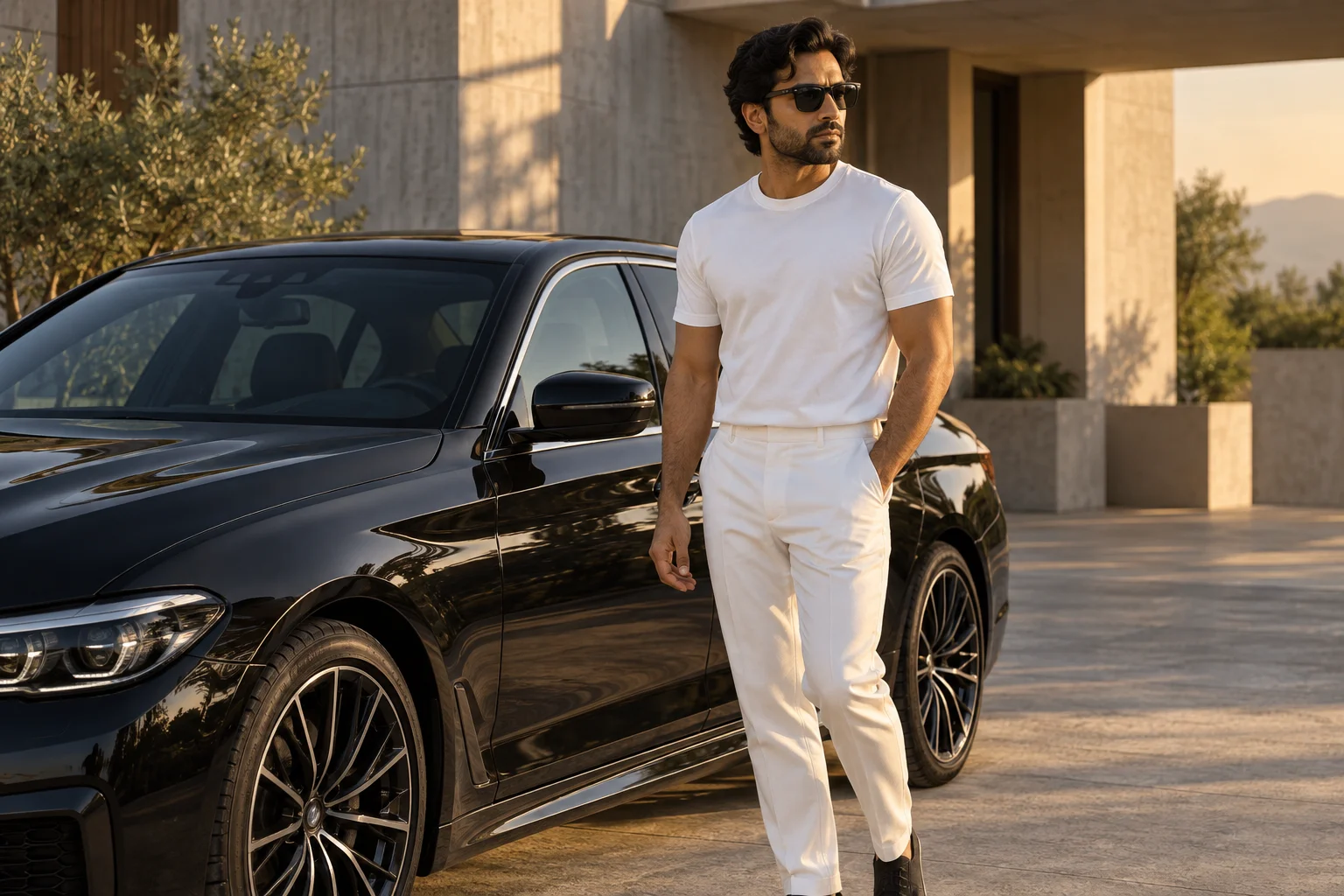
What does “Bodhi Kalpak prompt” mean in photo editing?
Current Bodhi Kalpak photo tutorials use the phrase for a character-inspired cinematic makeover: white clothing, sunglasses and a confident pose around a dark car. You may also see the joined spelling bodhikalpak prompt in social posts.
For your edit, the useful part is the visual brief. Describe the clothes, car, pose and light explicitly instead of relying on the name alone. Our prompts ask the editor to use your photograph for your appearance, rather than replace you with a named actor or the fictional subject in the illustration.
This guide provides original prompt examples for that look. It is not an official film filter, and the examples are not an exact reproduction of a movie frame.
How to use the prompt with your own photo
- Choose a clear reference. Use a recent photo with an unobstructed face, little motion blur and even lighting. A waist-up or full-length photo provides more information about your proportions than a tiny profile picture.
- Open the photo editor with the prompt loaded. Upload your reference photo. The illustration in this article is a style example, not the face reference you should use.
- Review the composition. The link requests a 3:4 portrait shape. Select a model and resolution in the editor and check the displayed cost. Keep the first request simple before adding an open door or a dramatic camera angle.
- Generate and compare. Sign in, generate, then compare the face and body with your original. Check the sunglasses, hands, car edges and white clothing before saving.
- Revise one detail. If the pose is wrong, change the pose instruction. If the face drifts, simplify the scene and use a clearer reference. Changing every instruction at once makes it harder to identify what helped.
The main link opens our photo-editing workflow because this task depends on an uploaded reference. If you want a completely invented person instead, use the AI image generator and describe the subject from scratch.
Three prompt variations for the same look
Choose a variation to solve a specific composition need. Each text is a complete instruction; you do not need to combine it with the main prompt.
White outfit and sunglasses: a tighter portrait
Use my photo to make a waist-up editorial portrait of me in a plain white shirt and dark rectangular sunglasses. Keep my face shape, hairline, age and skin tone close to the reference. Turn my shoulders slightly while keeping my head nearly facing the camera. A parked black car should appear out of focus behind one shoulder. Use soft side light and a simple background, with clear separation between the glasses, nose and eyebrows. Keep skin texture and shirt folds. No lettering or added people.
Use this version in the photo editor →
Black-car arrival: simplify the door and hands
Use my uploaded photo as the reference for my appearance. Make a cinematic arrival scene with me in a white shirt, white trousers and dark sunglasses, standing immediately outside the open rear passenger door of a parked black sedan. Both feet are already on the pavement and both arms rest by my sides. Keep the door behind my body rather than crossing my face or hands. Use an eye-level three-quarter view, soft afternoon light and realistic scale between the person and car. Keep the face recognizable and the background quiet. No other people or text.
Use this version in the photo editor →
Cool dusk: keep the face and white shirt readable
Create an early-evening portrait based on my uploaded photo. Keep my recognizable facial structure, hair, age and skin tone. Dress me in a white crew-neck shirt and white trousers with dark sunglasses. Place me beside a stationary black sedan on an uncluttered driveway at blue hour. Use a soft warm light on my face and upper body against the cooler surroundings. Retain detail in the shirt, car panels and shadows. Keep the pose still and relaxed, with hands separate from the car. No neon glow, lettering or additional people.
Use this version in the photo editor →
Make the result look more like you
Reference quality matters more than adding a long list of dramatic adjectives. If you upload a heavily filtered selfie, the filter becomes part of the information the model sees. Start with a natural photo and ask to retain specific features such as your hairline, jaw shape or facial hair where relevant.
Dark sunglasses cover useful facial detail. If you struggle to recognize yourself, first try the composition without sunglasses. Once the face and framing look closer to your reference, add the glasses in a separate edit. That extra generation can cost credits, so it is an optional refinement rather than a required step.
Do not ask the model to change your age, hairstyle and face shape while also asking it to preserve your appearance. Keep those features stable and put the creative changes into the clothing, setting and light. No wording can guarantee a perfect identity match.
Fix the common problems
| What went wrong? | What to change in the next prompt |
|---|---|
| The face looks like a different person | Use a sharper reference, reduce the scene complexity and name the facial features to retain. Avoid asking for another person's face. |
| The sunglasses merge into the eyebrows or nose | Request simple frames, a near-front head angle and clear separation around the bridge of the glasses. |
| The hand intersects the car door | Ask for a standing pose with both arms by your sides and the door behind you. Avoid gripping a handle in the first attempt. |
| The white shirt is a flat bright patch | Ask for visible fabric folds and softer light. Remove conflicting instructions for intense highlights and extreme contrast. |
| The car is stretched or looks too small | Use an eye-level view and a parked sedan beside the person. Remove wide-angle and extreme low-angle instructions. |
| The picture is not actually high resolution | Choose the output resolution in the tool. Writing “8K” in a prompt does not set the exported pixel dimensions. |
Keep an accepted version before trying a more complicated scene. A believable standing portrait can be more useful than a dramatic arrival image with broken anatomy or an unrecognizable face.
Frequently asked questions
Do I need Gemini to use a Bodhi Kalpak prompt?
No. The text describes an image-editing goal rather than a special command tied to one provider. You can try it in our photo editor with an uploaded reference. Different image models interpret the same brief differently; these examples have not been benchmarked across Gemini, ChatGPT and our available models.
Can I use a selfie instead of a full-body photo?
Yes, but the model will need to invent whatever the selfie does not show. Try the waist-up version first. A reference that includes your shoulders and torso gives more context for proportions and clothing than a tightly cropped face.
Can I keep my own hairstyle and beard?
Ask to retain them and use a reference where they are clearly visible. Remove any instruction that introduces a different hairstyle or facial hair. Inspect the result rather than assuming an identity-preservation sentence guarantees a match.
Is this a photo prompt or a video prompt?
The prompts here create still images. The car-arrival variation describes one moment with both feet on the ground; it does not generate a moving clip or a timed sequence.
Is it free to generate?
Reading and copying these prompts is free. Generation requires sign-in and sufficient credits for the selected settings. Check the cost in the editor and see current credit packages if you need more.
Can I turn the result into a lookbook?
You can use the accepted portrait as a starting reference for a multi-pose composition. See our lookbook photo AI tool and prompts for layouts. Review the face and outfit again because additional generations can change details.
Try the white-outfit and black-car prompt with your own photo → Start with the simple version, compare it with your original, and only then add a more elaborate pose.